The whole practice, one workflow.
Lemonade connects scheduling, communication, charting, prior authorization, and management oversight, so each step of a visit starts from what the last step collected. Every screen on this page is from the Lemonade demo clinic.
- Lemonade does
- Routine steps: reminders, confirmations, preparation, follow-up
- Your staff do
- The exceptions Lemonade surfaces
- Managers see
- Progress, ownership, and what is overdue
- New practices
- $99/month total for up to 3 providers
Part 1 of 4
Before the visit
Most of the work that decides whether a visit goes well happens days or weeks before it. Lemonade does that work continuously, not the morning of.
Scheduling
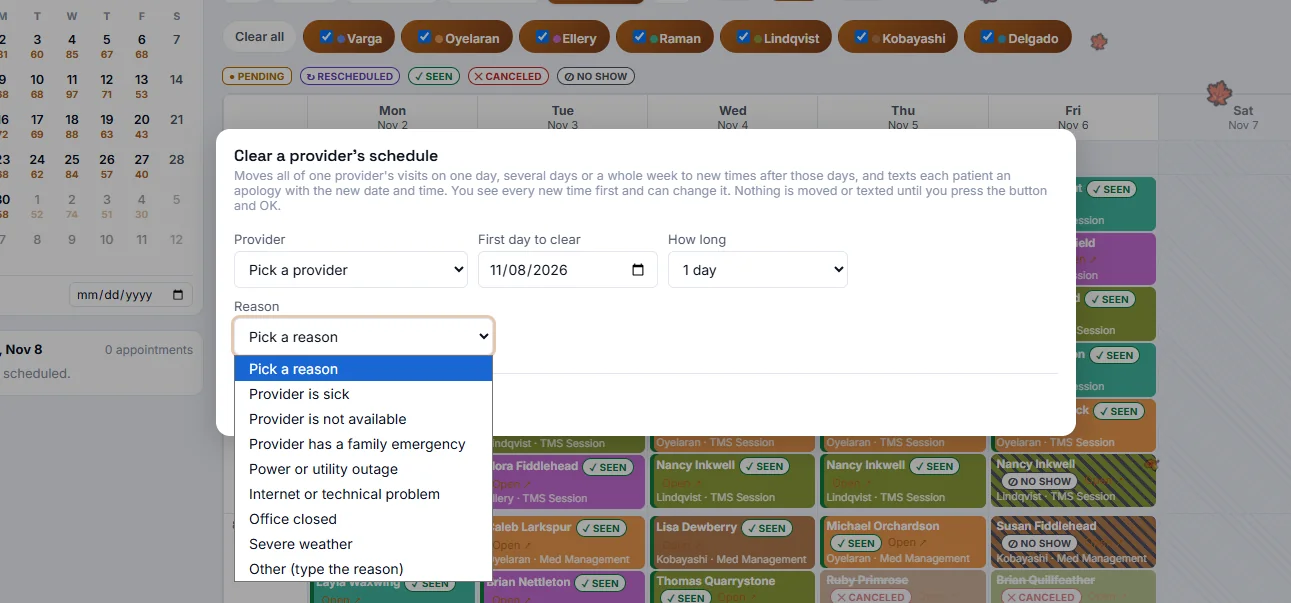
Every provider's week in one schedule
Every visit shows whether the patient confirmed by text or by the reminder call, so providers see no-show risk before the day starts. When a provider is out, the whole day moves at once.
- Lemonade
- Shows confirmation status on every visit: pending, seen, rescheduled, canceled, no-show
- Clears a provider's day, several days, or a week, finds new times, and texts each patient an apology with the new time
- Imports appointments from a screenshot or PDF
- Your staff
- Review the proposed new times before anything is moved or sent.
- Takes off your plate
- The afternoon of phone calls after a provider calls in sick.
 Open full size
Cancellation management
Automatically offer canceled appointments to waiting patients
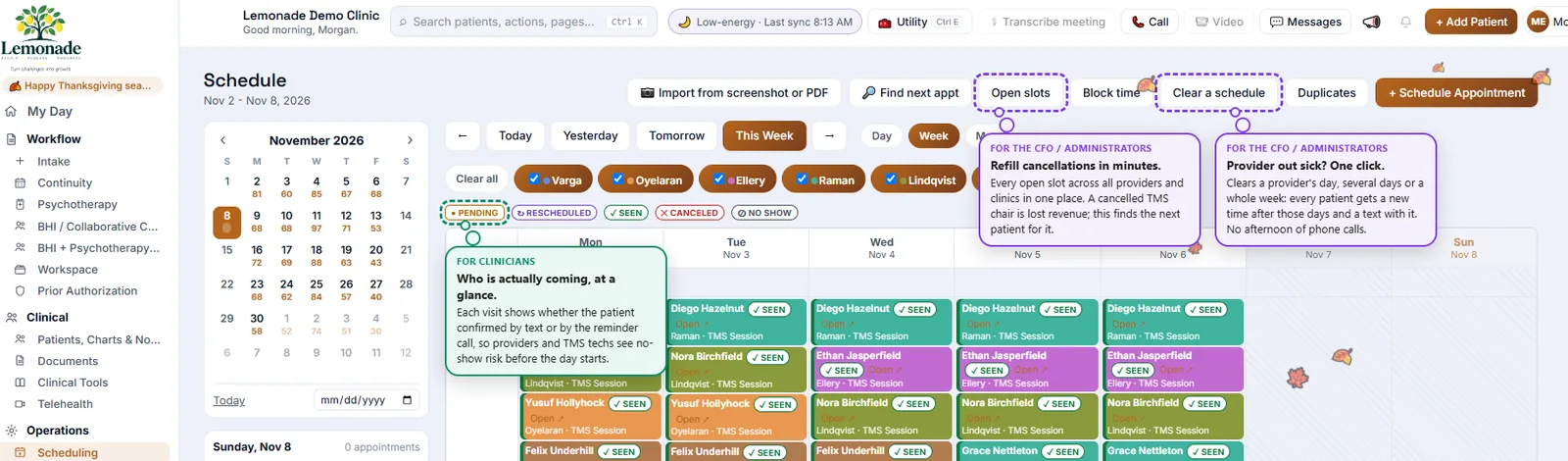
When a patient cancels, Lemonade offers the open slot to patients on the cancellation list, so a canceled appointment has a better chance of being filled instead of lost.
- Lemonade
- Offers open slots to patients on the cancellation list automatically
- Finds every open slot across providers and clinics in one place
- Your staff
- Talk to the patients who need a person.
- Takes off your plate
- Working down a waitlist by phone.
 Open full size
Continuity / visit preparation
Start preparing each visit weeks ahead
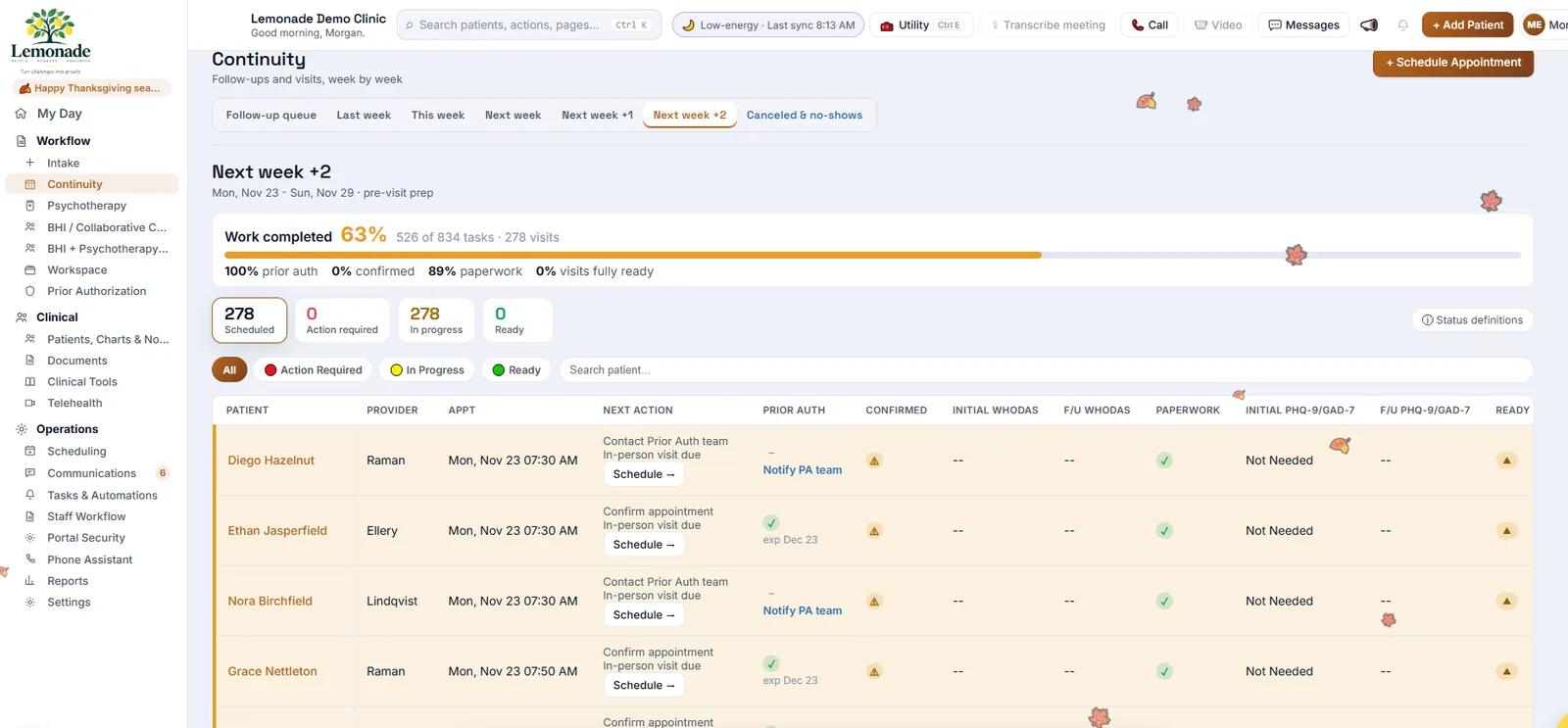
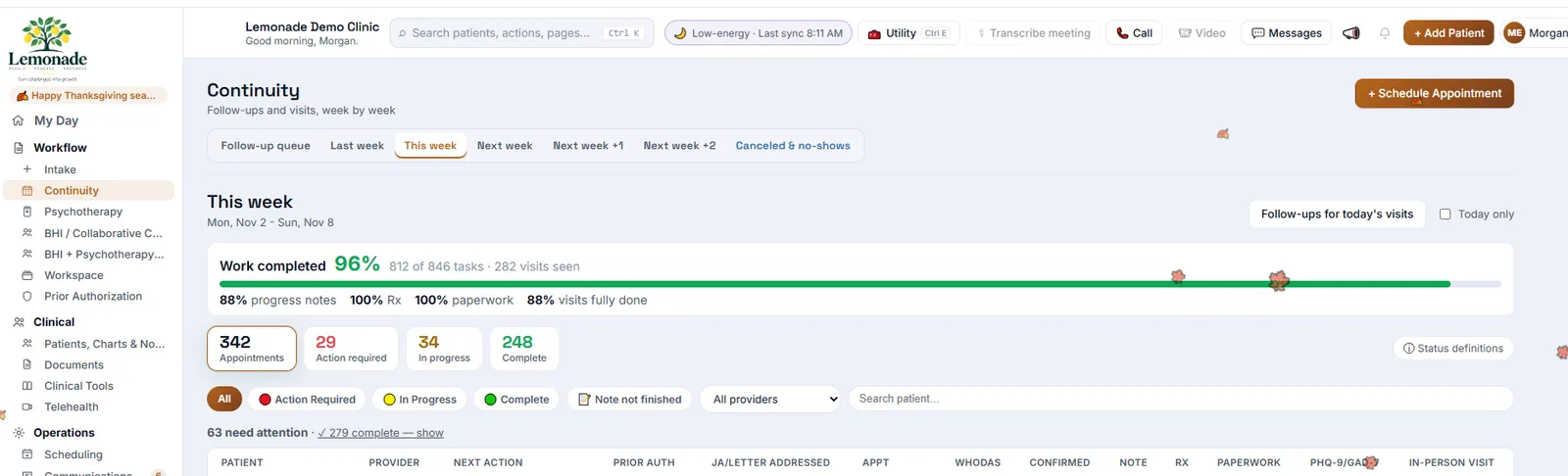
Continuity breaks every week into the tasks each visit needs: prior authorization, confirmation, paperwork, questionnaires, notes. It shows the percentage done and how many patients are ready, this week and the weeks ahead.
- Lemonade
- Lists what each upcoming visit is still missing
- Shows the next action for every patient, with one-click scheduling
- Automations take care of routine preparation steps
- Your staff
- Work the outstanding items while there is still time to fix them.
- Takes off your plate
- Discovering missing paperwork or authorization when the patient is already in the waiting room.
 Open full size
Patient intake
Referrals tracked from first contact to first visit
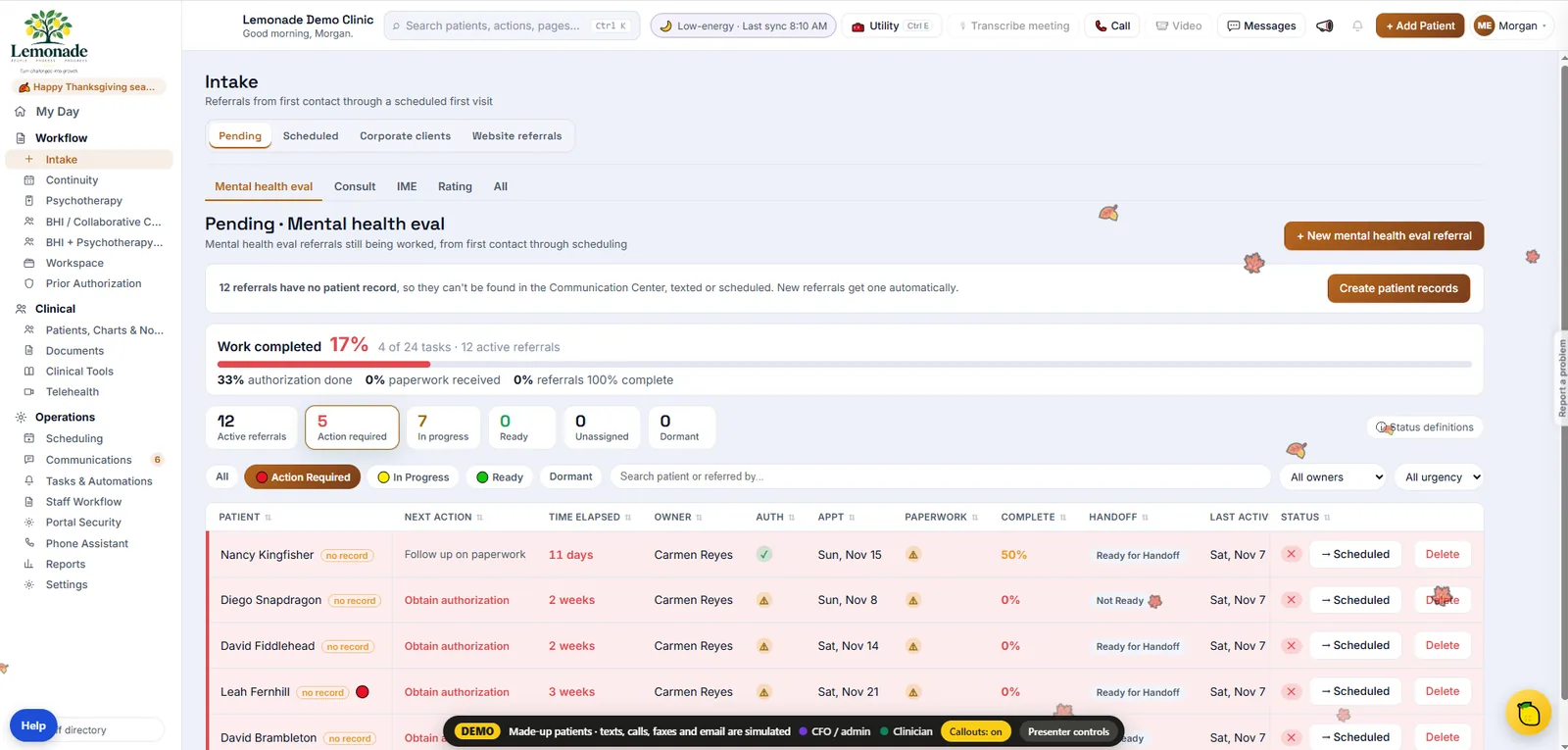
Intake follows every referral, from your website, a corporate client, or a referral source, until the first visit is scheduled. New referrals get a patient record automatically, so they can be texted and scheduled right away.
- Lemonade
- Tracks authorization, paperwork, and completion for every referral
- Shows who owns each referral and how long it has been waiting
- Sends secure intake forms whose answers land in the record
- Your staff
- Take the next action Lemonade lists on each referral.
- Takes off your plate
- Spreadsheets of referrals and re-typing intake paperwork.
 Open full size
Part 2 of 4
Communication, throughout
Phone, text, fax, and email run through one place, and routine replies update the workflow on their own.
Unified communications
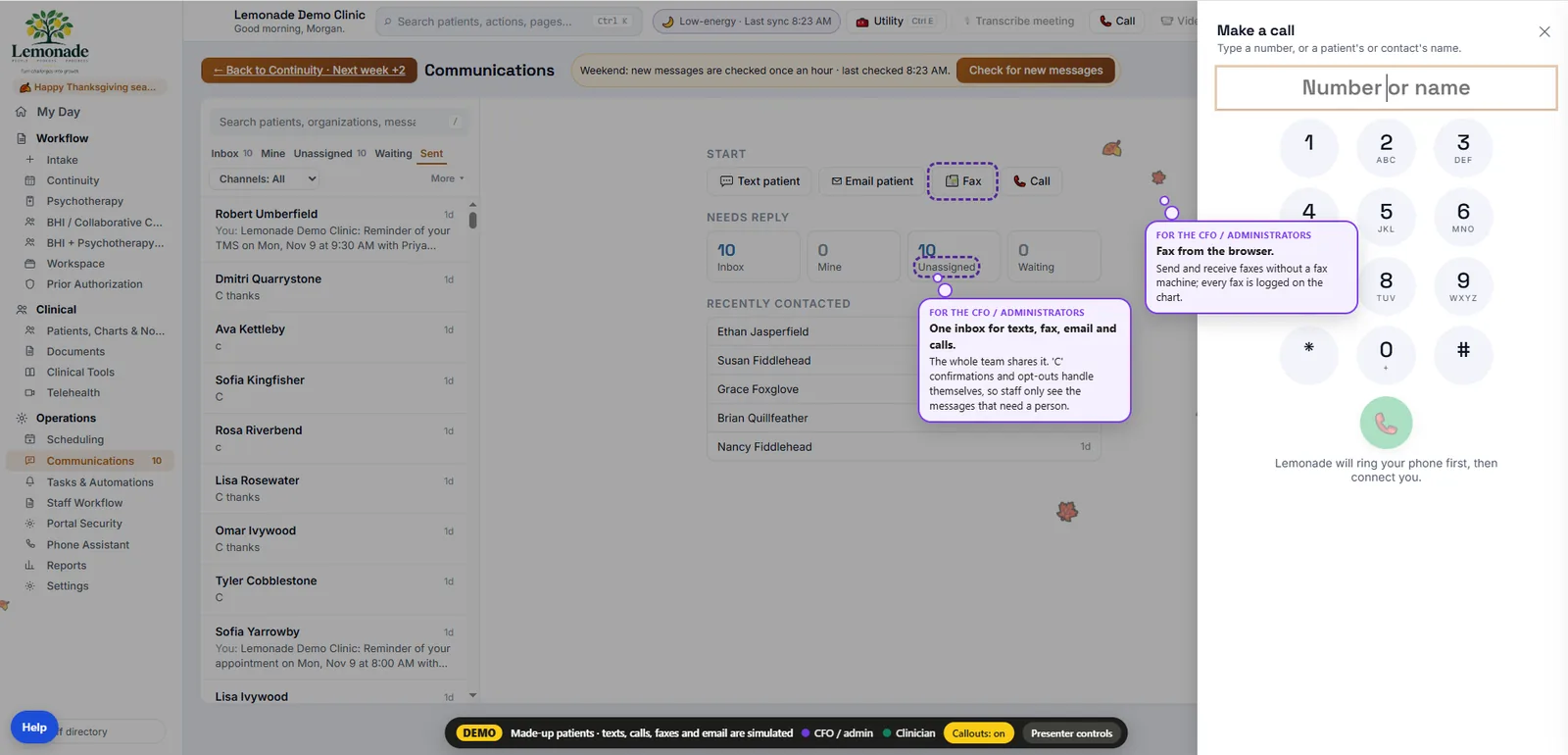
Calls, fax, text, and email in one shared inbox
Incoming and outgoing calls, faxes, texts, and email in one inbox the whole team shares. A “C” reply confirms the visit and opt-outs handle themselves, so staff can focus on the messages that need a person.
- Lemonade
- Updates the schedule from replies to reminders
- Sends and receives faxes from the browser and logs them on the chart
- Rings your phone first, then connects your call
- Your staff
- Answer the messages in Mine and Unassigned.
- Takes off your plate
- Reminder calls, voicemail follow-ups, and the fax machine.
 Open full size
Telephone automation
A phone assistant that handles routine calls automatically
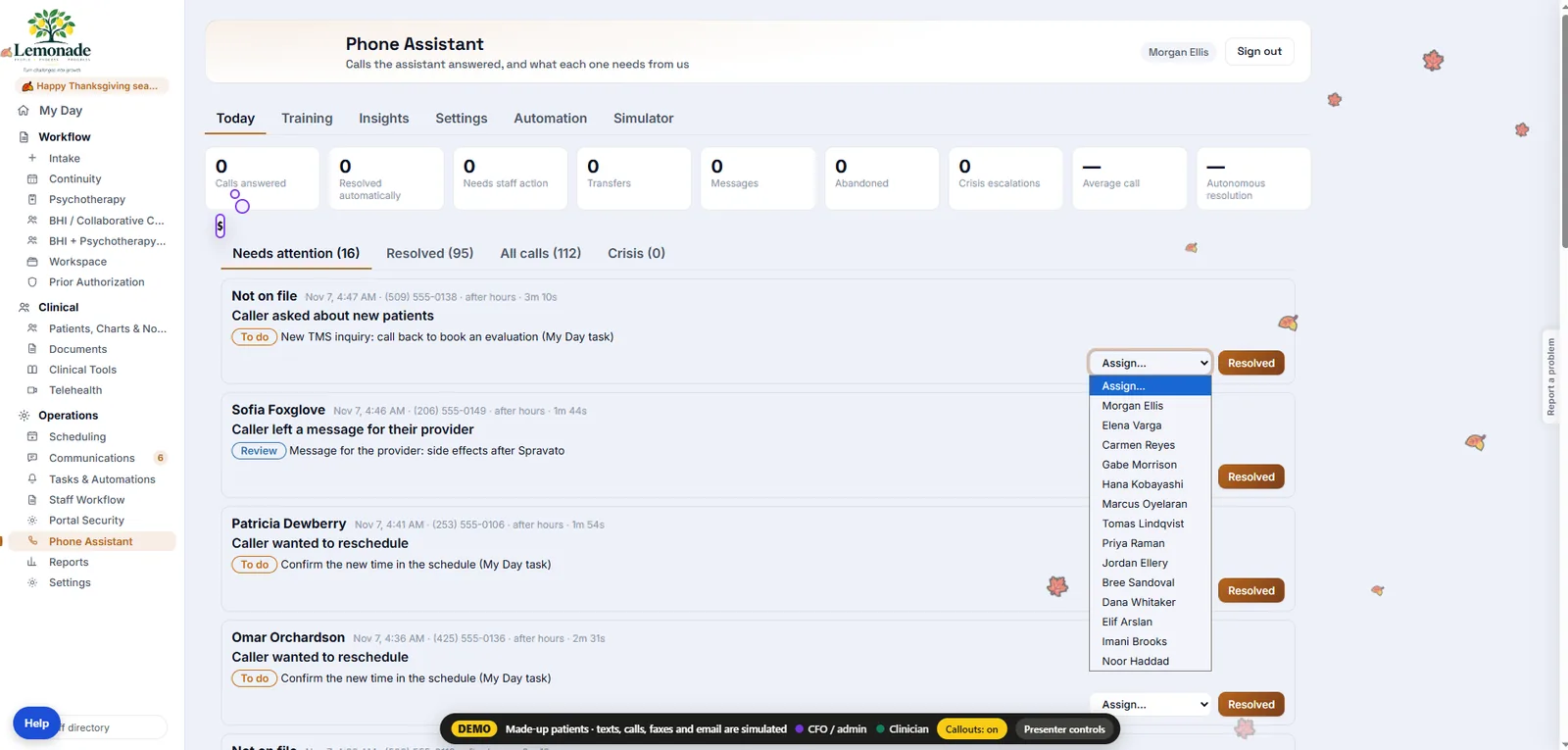
The phone assistant answers calls, including after hours, handles routine requests, and flags what needs staff attention. You get an instant summary of the day: calls answered, resolved automatically, needing staff action, and transferred.
- Lemonade
- Handles routine calls without staff
- Turns the rest into tasks with the next step written out
- Lets you assign a flagged call to anyone in one click
- Your staff
- Return the calls marked Needs attention.
- Takes off your plate
- Listening to voicemail and returning routine calls.
 Open full size
SMS
Patients help themselves by text
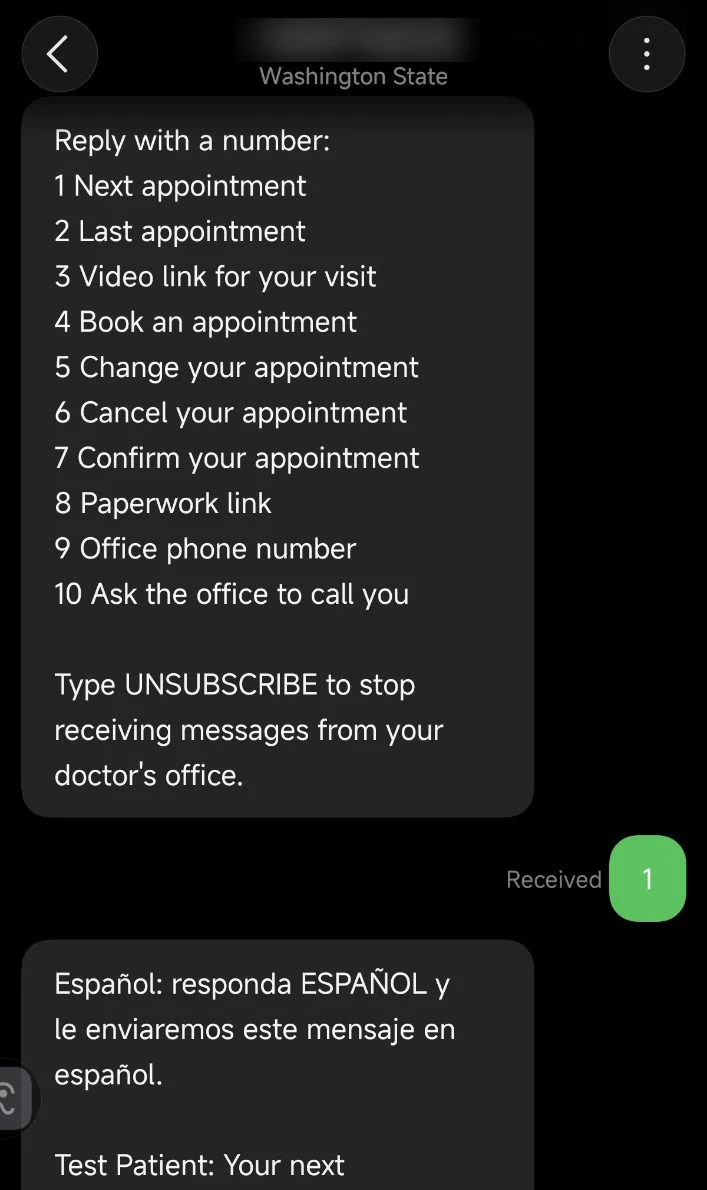
Patients reply with a number to get their next or last appointment, their video link or paperwork link, or the office number, or to book, change, cancel, or confirm a visit. Spanish is one reply away.
- Lemonade
- Answers routine requests by text, any time
- Updates the schedule when a patient confirms, changes, or cancels
- Handles UNSUBSCRIBE automatically
- Your staff
- Call back the patients who reply 10, “Ask the office to call you”.
- Takes off your plate
- Phone calls that only needed a date, a link, or a yes.
Part 3 of 4
During the visit
The provider's job is the patient. Lemonade puts the information in front of them and keeps the rest out of the way.
Telehealth
Video visits inside the chart
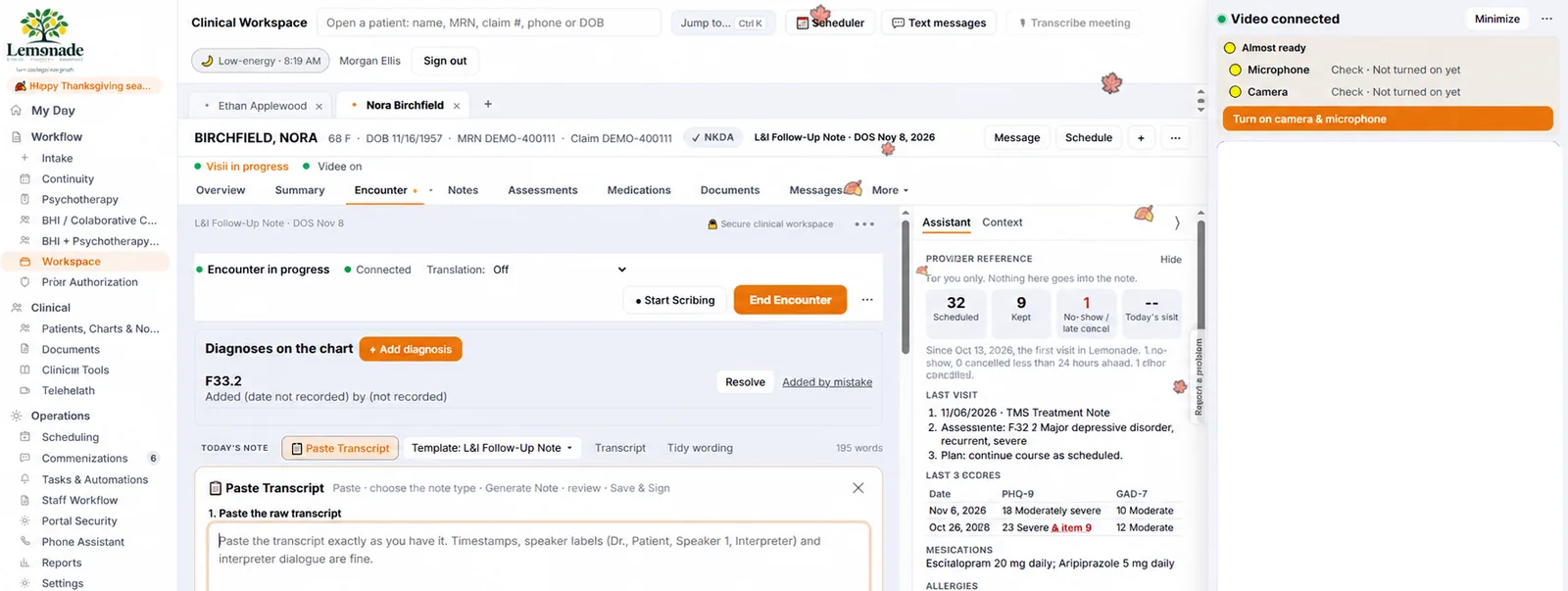
Video runs in the patient's chart, next to the note. Built-in checks look for camera and microphone problems and walk through the fix before the visit, to help visits start on time.
- Lemonade
- Checks camera and microphone before the visit
- Keeps visit history, recent scores, and medications beside the video
- Offers translation during the encounter
- Your staff
- Help the occasional patient who still can't connect.
- Takes off your plate
- “Can you hear me?” calls and late starts.
 Open full size
Charting
Notes start from what is already known
Note templates for each visit type, with the patient's intake, prior visits, and scores already in the chart. Lemonade doesn't write clinical content for the provider.
- Lemonade
- Opens the right template for the visit type
- Keeps diagnoses, medications, and documents on the chart
- Tidies wording and accepts a pasted transcript
- Your staff
- The provider writes the clinical note.
- Takes off your plate
- Re-typing history the patient already gave.
Part 4 of 4
After the visit
Closing the loop: the chart is finished, the next visit is booked, and the authorization and bill are handled.
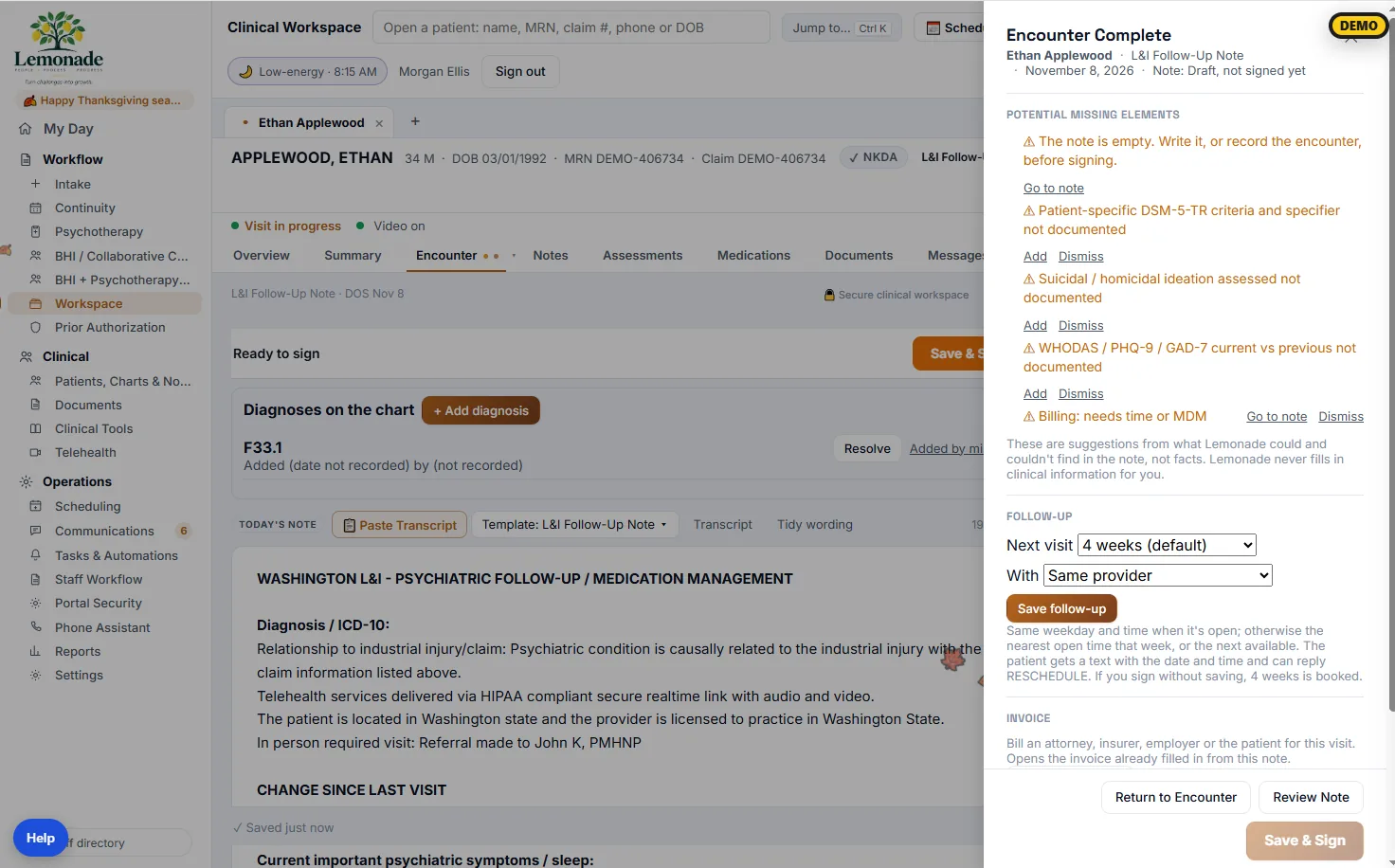
Encounter-completion monitoring
Catch missing items before signing
When a provider ends the encounter, Lemonade lists what the note may be missing. These are suggestions only. Follow-up is booked by default at a preset interval, or the provider picks one, and the patient gets a text with the date and time.
- Lemonade
- Reminds the provider of missing items before signing
- Books the follow-up and texts the patient
- Opens the invoice already filled in from the note
- Your staff
- The provider adds what's missing, or dismisses the suggestion.
- Takes off your plate
- Notes sent back for missing items, and follow-ups nobody booked.
 Open full size
Prior authorization
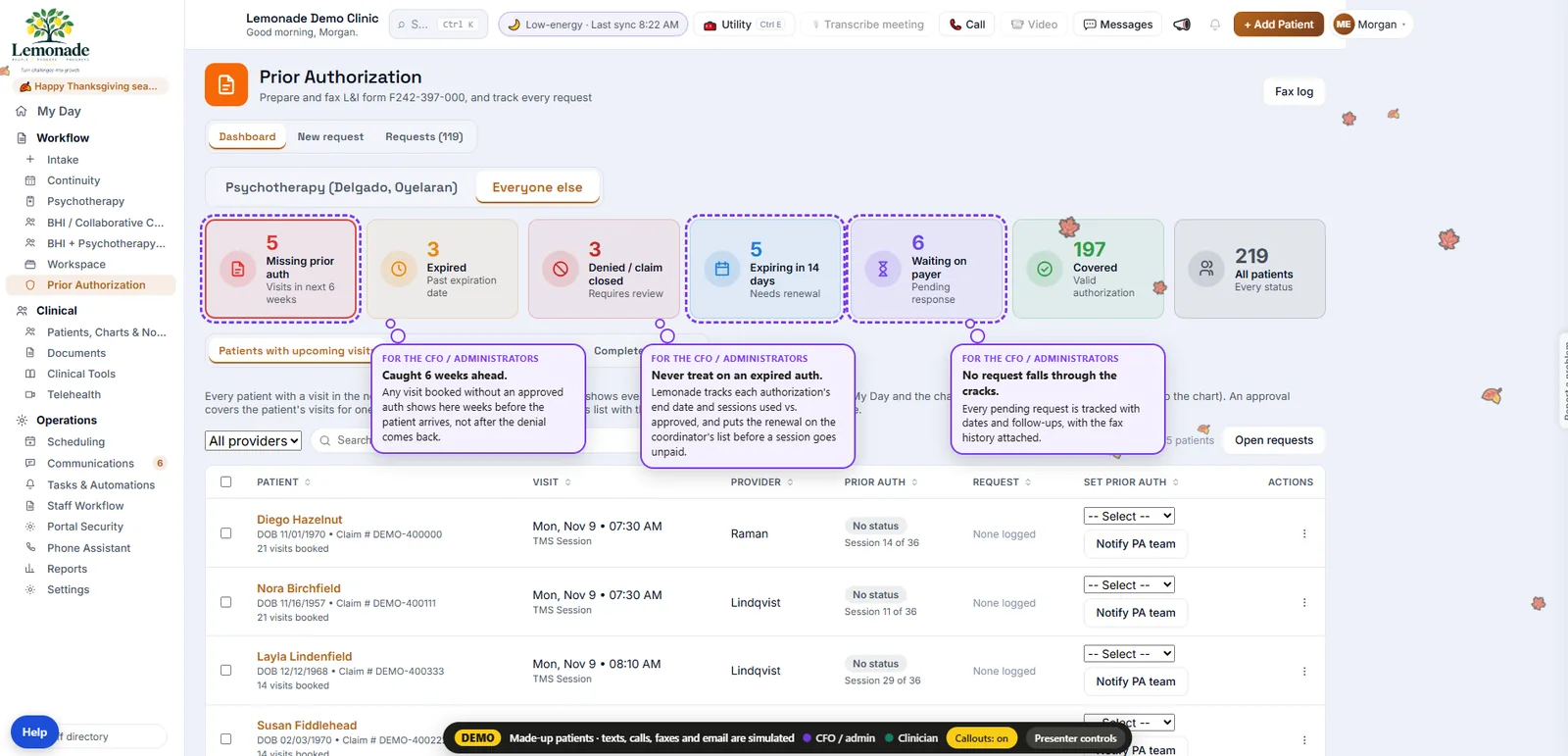
Every authorization in one place, for the whole team
Visits booked without an approved authorization show up weeks before the patient arrives. Expiring authorizations go on the renewal list before a session goes unpaid, and every pending request is tracked with its fax history.
- Lemonade
- Catches missing authorizations for visits in the next 6 weeks
- Tracks sessions used against sessions approved
- Prepares and faxes requests from Lemonade
- Your staff
- Work the requests Lemonade flags.
- Takes off your plate
- Denied claims from expired or missing authorizations.
 Open full size
Management oversight
Lemonade isn't only an EHR. Managers can see the work.
The workflows on this page are monitored. Outstanding tasks are visible, processes can be audited, and a manager working remotely can see whether the work is actually being done.
- Progress
- Percent of work complete for this week and the weeks ahead, broken down by notes, prescriptions, paperwork, authorizations, and visits.
- Ownership
- Every open task has an owner, so you can see who is behind and what is waiting on whom.
- Exceptions
- Action required, overdue, and needs-attention counts on every workflow.
- Calls
- A daily summary of calls answered, resolved automatically, and needing staff action.
- History
- What happened and when, so you can audit how a referral, visit, or request was handled.
 Open full size
Billing services · optional
Billing follows the encounter. The service is separate from the software.
The invoice already opens filled in from the note. If you want us to run billing for you, that is an additional service with its own terms.
- Upfront cost
- None
- Deployment fee
- None
- Rate
- Negotiated by practice and specialty, as low as 6.99%
- When the fee is earned
- Only when your practice actually collects
- Deposits
- Go to your own bank account
Your website
The website is the front door to Lemonade
A visitor comes to your site and books, sends a referral, requests services, or fills in a form. That goes straight into Lemonade and starts the same workflow as everything else. Website development is priced separately below.
- 01
Visitor arrives
Finds your practice and what you offer.
- 02
Takes an action
Books, refers, requests services, or completes a form.
- 03
Lemonade receives it
A record, a referral, or an appointment is created.
- 04
Workflow starts
Reminders, intake, authorization, and preparation begin.
One ecosystem
Lemonade is the layer the practice's work moves through
Brings work in
- Website brings patients and customers in
- Forms bring information in
- Phone & text bring requests in
Moves the work
- Scheduling organizes the work
- Communications keep people informed
- Continuity makes sure the next step happens
- Charting captures the clinical encounter
- Billing completes the financial workflow
Keeps watch
- Management monitors the whole process
- Compliance manages workforce requirements
Pricing
What each part costs
Software, extensions, website work, and billing services are priced separately.
Lemonade software subscription
Larger or established practice? Ask us during a demo.
- New practice specialThe full platform for new small practices with up to 3 providers: scheduling, communication, charting, prior authorization, and management oversight.$99/month total, not per provider
Forms
- Secure FormsForms that write into the Lemonade back end and start the next step. Back-end build included at 10 or more forms.$29/month per form
Compliance tracking
- BaseUp to 10 users. HIPAA training plus 3 custom policies.$29/month
- AdvancedUp to 100 users and 20 custom policies.$99/month including 25 users, then $3/month per user
- EnterpriseMore than 100 users, set up around your organization.From $349/month, by agreement
Website development
- EssentialResponsive site with contact or intake forms that feed Lemonade.$2,000+
- ProfessionalCustom design with online booking, secure forms, and referrals into Lemonade.$4,000+
- Custom PlatformPatient portals, telehealth platforms, dashboards, and custom workflows.Custom quote
Billing services
Optional service, separate from the software subscription.
- Billing serviceNo upfront cost and no deployment fee. Deposits go to your own bank. The rate is negotiated by practice and specialty, and the fee is earned only when your practice actually collects.As low as 6.99% of collections, depending on specialty
Questions practices ask
Is billing included in the subscription?
No. Billing is an optional service with its own terms: no upfront cost, no deployment fee, and a rate negotiated by practice and specialty. The fee is earned only when your practice collects.
Who is the new practice special for?
New small practices with up to 3 providers. The $99/month is the total, not per provider.
What do my staff still do?
The exceptions. Lemonade handles or monitors the routine steps and shows staff what needs a person: a patient who wants to talk, a missing authorization, an unfinished note.
Is it HIPAA compliant?
All forms are secure, and healthcare forms are HIPAA compliant. Data is encrypted at rest and hosted in US data centers, and we sign a BAA with customers. See the Security page for details.
See a week of your own visits in Lemonade
We'll walk through your schedule, preparation, communication, and charting, and show which steps stop landing on your staff.