The practice operating platform
Run the whole practice from one system.
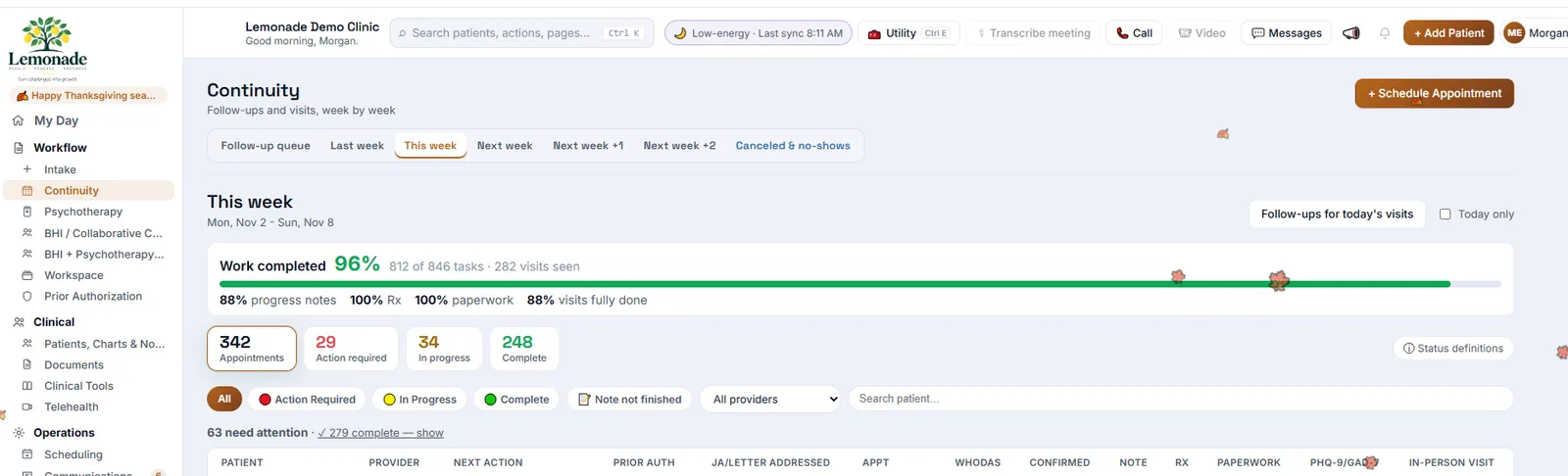
Scheduling, communication, charting, billing, forms, and administrative work stay connected from the first appointment through payment. Information moves through the practice instead of being re-entered, chased, or handed off by staff, which means less repetitive admin for providers and non-clinical staff.
 Open full size
How it works
One workflow, from booking to payment
These aren't separate applications. The patient, the visit, the note, and the bill stay one connected record, so information is entered once and every hand-off is tracked. Open any step for detail.
Before the visit
011Schedule
The patient books from your website or by text, or staff book in the schedule.
2Fill cancellations
When a patient cancels, the open slot is offered to patients on the cancellation list.
3Confirm
Reminders go out by text and phone. A reply confirms, cancels, or asks to reschedule, and the schedule updates.
4Intake
Secure intake forms go out before the visit. Answers land in the patient's record.
5Records
Documents and records are requested, collected, and attached to the chart.
6Authorization
Visits without an approved prior authorization are flagged weeks ahead.
7Visit preparation
Continuity shows what each upcoming visit is still missing, and who owns it.
Lemonade · Continuity · weeks ahead Demo clinic · made-up patients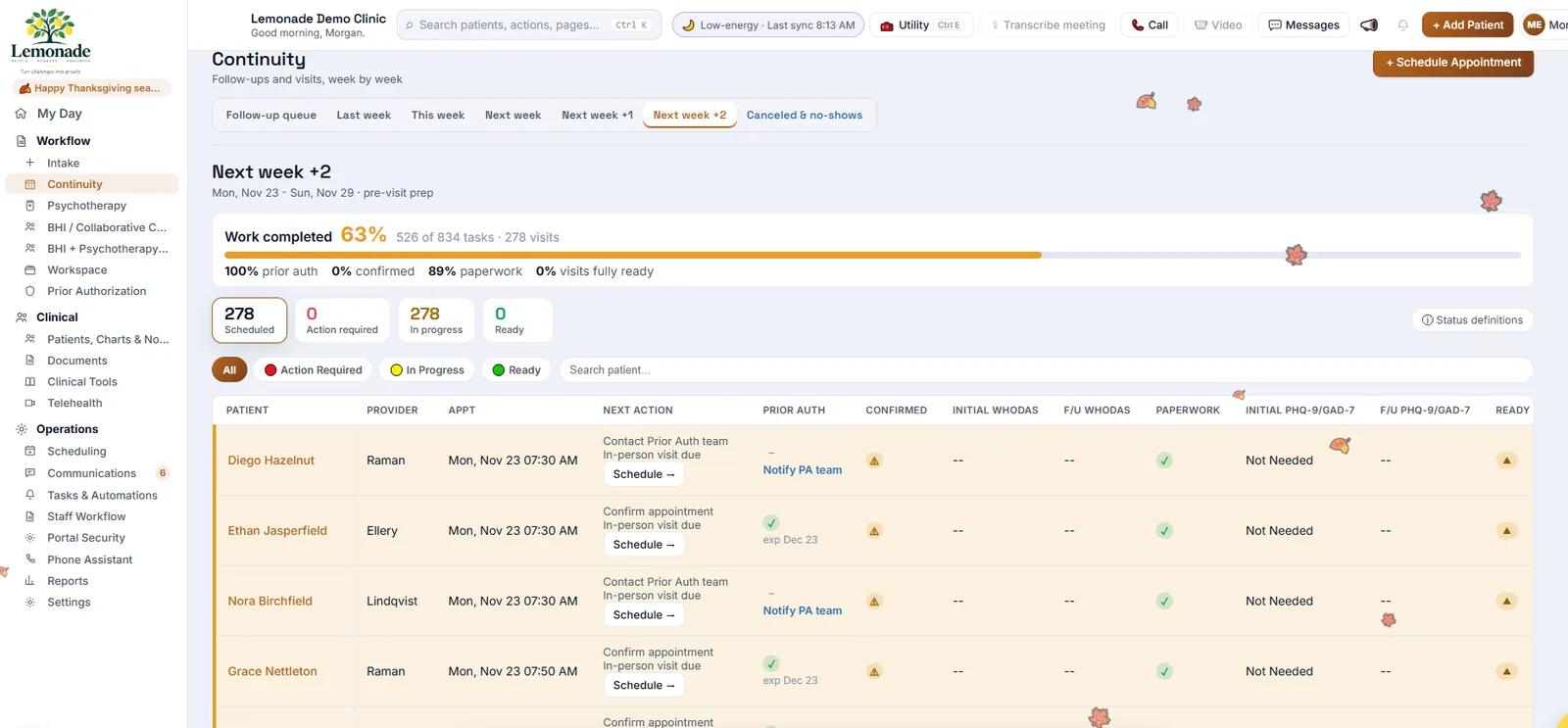 Open full size
During the visit
021Patient information
Recent visits, scores, medications, and allergies sit beside the note.
2Telehealth
Video runs inside the chart. Camera and microphone are checked before the visit starts.
3Clinical encounter
The provider sees the patient. Lemonade stays out of the way.
4Documentation
Note templates and transcript tools. Lemonade doesn't fill in clinical content for the provider.
Lemonade · Telehealth in the chart Demo clinic · made-up patients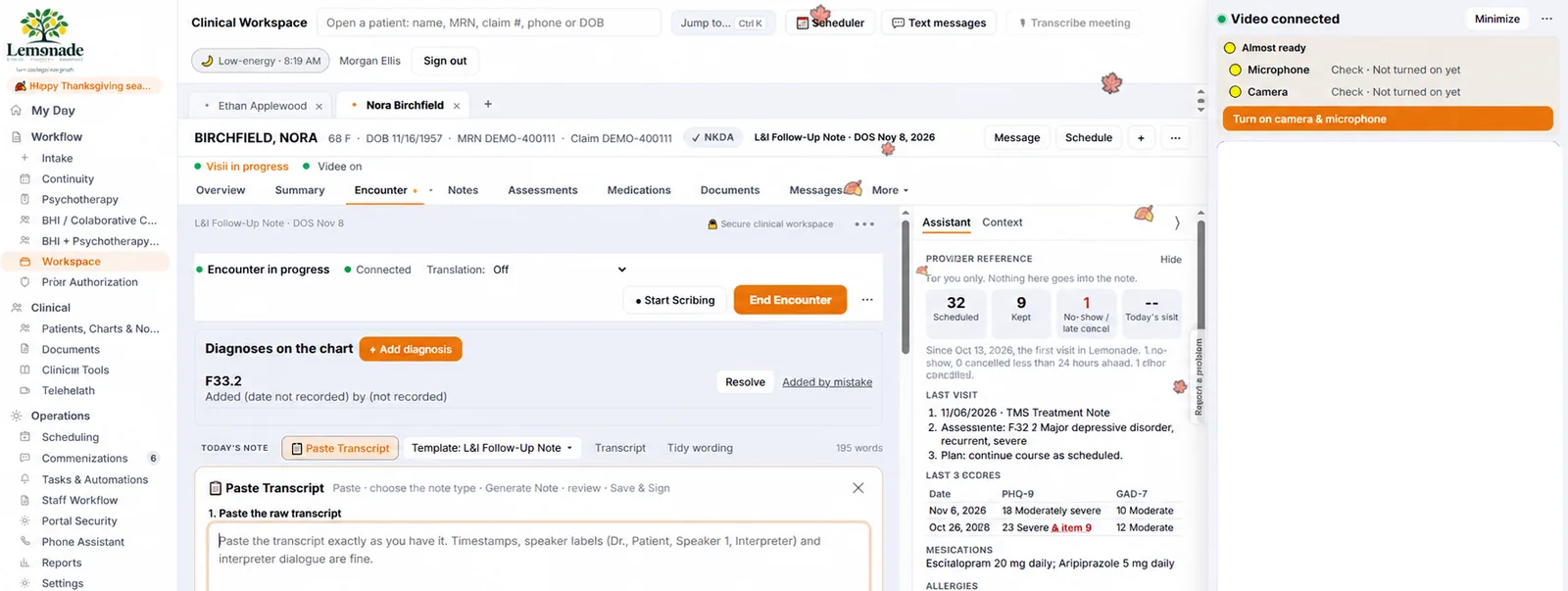 Open full size
After the visit
031Complete chart
Before signing, the provider sees what the note may be missing.
2Follow-up
The next visit is booked at a preset interval, or the provider picks one.
3Billing
The invoice opens already filled in from the note.
4Patient communication
The patient gets the new date and time by text, and can reply to change it.
5Next appointment
The follow-up is back in the schedule, and the cycle starts again.
Lemonade · Encounter complete Demo clinic · made-up patients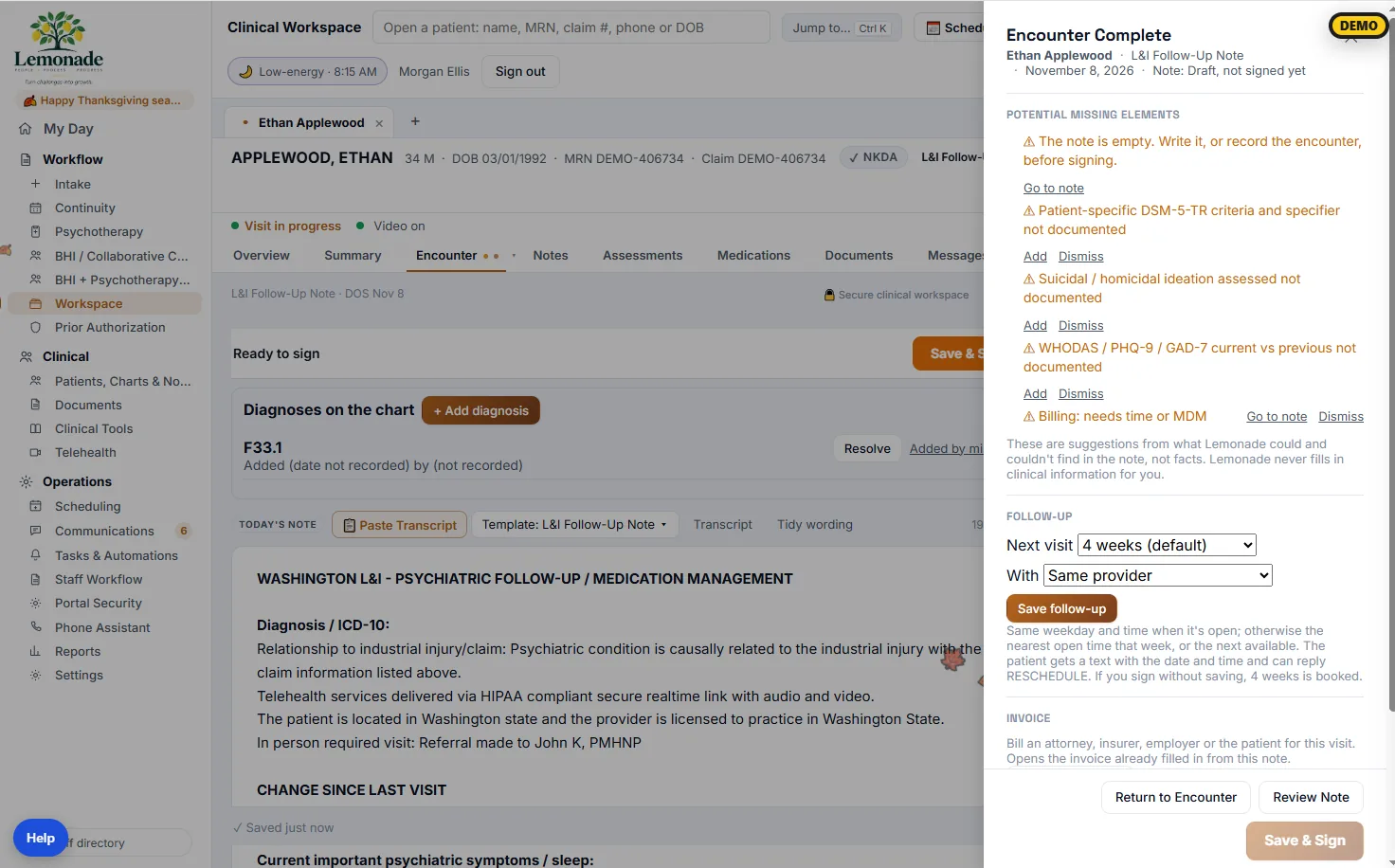 Open full size
How Lemonade reduces admin work
Your staff handles exceptions. Lemonade handles repetition.
Lemonade does or monitors the routine administrative steps. Staff spend their time where judgment, intervention, or a conversation is needed.
- Calling patients about routine appointment questionsLemonade…: Sends reminders and handles confirmations, cancellations, and reschedule requests by text and phone.Your staff…: Talks to the patients who need a person.
- Finding missing paperwork the morning of the visitLemonade…: Lists outstanding forms, records, authorizations, and questionnaires weeks ahead.Your staff…: Works the list while there is still time.
- Checking whether charts were completedLemonade…: Flags notes that are missing items or unsigned.Your staff…: Providers finish the flagged notes.
- Answering every routine phone callLemonade…: The phone assistant handles routine calls and turns the rest into tasks with the next step written out.Your staff…: Returns the calls that were flagged.
Management oversight
Managers see whether the work is actually getting done
Lemonade gives employees the tools to do the work, and gives management visibility over all of it. Especially useful with multiple locations or remote managers.
Management oversight
Every location · every stage · every owner
Where work is moving
Progress by stage and week
Where it has stopped
Waiting items and who they wait on
What needs attention
Action-required counts on every workflow
What isn't done
Open tasks, unsigned notes, unanswered calls
1 / 5
Before the visit
On track
2 / 5
Communication
4 need a reply
3 / 5
Encounter
On track
4 / 5
After the visit
3 notes unsigned
5 / 5
Billing
2 stopped: auth expired
Example statuses for illustration.
Entry points
Three ways into Lemonade
Each runs on the same back end, so you can add the rest later without re-entering anything.
- Medical practiceThe full platform: scheduling, communication, charting, prior authorization, and management oversight.New practices from $99/month
- Forms & operationsForms that start a workflow in Lemonade when someone presses Submit.$29/month per form
- Staff complianceKnow who is current, who is expiring, and who needs attention.Plans from $29/month
Your website is the front door into Lemonade Not in healthcare? Forms, workflow, and compliance for other organizations
Pricing
Pricing at a glance
Each part is priced separately. Billing is an optional service, not part of the software subscription.
- Lemonade softwareNew practices, up to 3 providers$99/month total
- FormsBack-end build included at 10+ forms$29/month per form
- Compliance trackingBase, Advanced, and Enterprise plansFrom $29/month
- Website developmentEssential, Professional, Custom PlatformFrom $2,000+
- Billing services (optional)No upfront cost, no deployment fee, earned when you collectAs low as 6.99%, by specialty
All forms are secure. Healthcare forms are HIPAA compliant. Data is encrypted at rest and hosted in US data centers. Security details
See your own practice's workflow in Lemonade
We'll walk through a week of your visits: what Lemonade would take off your staff, and what they would still do.